Model-aware exports
Export component views from their own axes so front, top, and side views stay straight and consistent.
A SketchUp Desktop extension with a companion browser drawing workspace. Turn your SketchUp fabrication model into organized shop drawings with component views, sections, dimensions, BOMs, and PDF output.
30 days free · No card required · macOS primary testing · Windows beta support
SketchUp extension — not a standalone app. Your own SketchUp Pro license is required. Install Steel Fab Lab in SketchUp Desktop. It does not work with SketchUp Go, SketchUp for Web, or SketchUp for iPad or other mobile versions. A SketchUp license is not included.

SketchUp authorized
One-time setup · secure licensing
Video walkthrough
Watch the complete workflow from Steel Fab Lab tools in SketchUp through organized fabrication drawings in the browser workspace.
Open video in a new tabA direct workflow
Keep geometry work in SketchUp and drawing work in a purpose-built browser workspace. Your project files remain in the local folder you choose.
Open your project dashboard, make a project, and pair its local drawing folder.
Authorize one SketchUp computer, then use the full tool suite across every model and project.
Place viewports, annotate sheets, refresh updates, and export the finished PDF set.
Drawing tools that understand the model
Export component views from their own axes so front, top, and side views stay straight and consistent.
Place a section in the drawing workspace and send the cut directly to the open SketchUp model.
Control holes, hidden objects, and line styles directly in each viewport.
Add dimensions, labels, weld symbols, hatches, and detail callouts on full-size sheets.
Refresh viewports from the latest local export while keeping formal revisions separate and intentional.
Build component sheets, update bill-of-material tables, and export production-ready PDF sets.
Steel Fab Lab is still in beta. The complete workflow is available now, and we are continuing to refine tools, fix issues, and improve reliability before the final release.
Tell us what is not working, what you expected, or what would make the workflow better. Screenshots and examples are welcome.
Email beta feedbackIf 30 days was not enough to evaluate the beta, email us from your account address and request a trial extension.
Request an extensionBefore you start
Steel Fab Lab is being tested on real fabrication work. These are the most important things to know before installing it.
macOS is the primary tested platform. Windows support is available in beta and is still being validated across different installations.
No. Steel Fab Lab is a SketchUp Desktop extension with a companion browser drawing workspace. Modeling and exports use the installed extension in SketchUp; the browser workspace is used to lay out and annotate drawings.
Yes. You must have your own SketchUp Pro license and use SketchUp Desktop. A Steel Fab Lab trial or subscription does not include a SketchUp license. Steel Fab Lab does not work with SketchUp Go, SketchUp for Web, or SketchUp for iPad or other mobile versions.
Steel Fab Lab requires SketchUp Desktop with your own SketchUp Pro license. If your desktop version or installation behaves differently, email support so we can verify it during beta.
Your JSON exports, BOM CSV files, and SDP drawing files remain in the local project folder you choose. The standard workflow does not upload those source files.
No. The beta trial lasts 30 days and does not renew automatically. You choose whether to start the $25 monthly subscription afterward.
Yes. If you need additional time to test a real project, email us from your account address and request a trial extension.
Email steelfablab@gmail.com with your SketchUp version, operating system, what you expected, and screenshots when possible.
Yes. Steel Fab Lab is a drafting tool, not an engineering or fabrication-certification service. Every drawing and measurement must be independently checked by the user and reviewed by a qualified registered design professional before fabrication or installation.
Representative sample sheets
These redacted examples show the range of views, annotations, sections, and fabrication information the workflow can produce. Select any sheet to inspect it at full size.
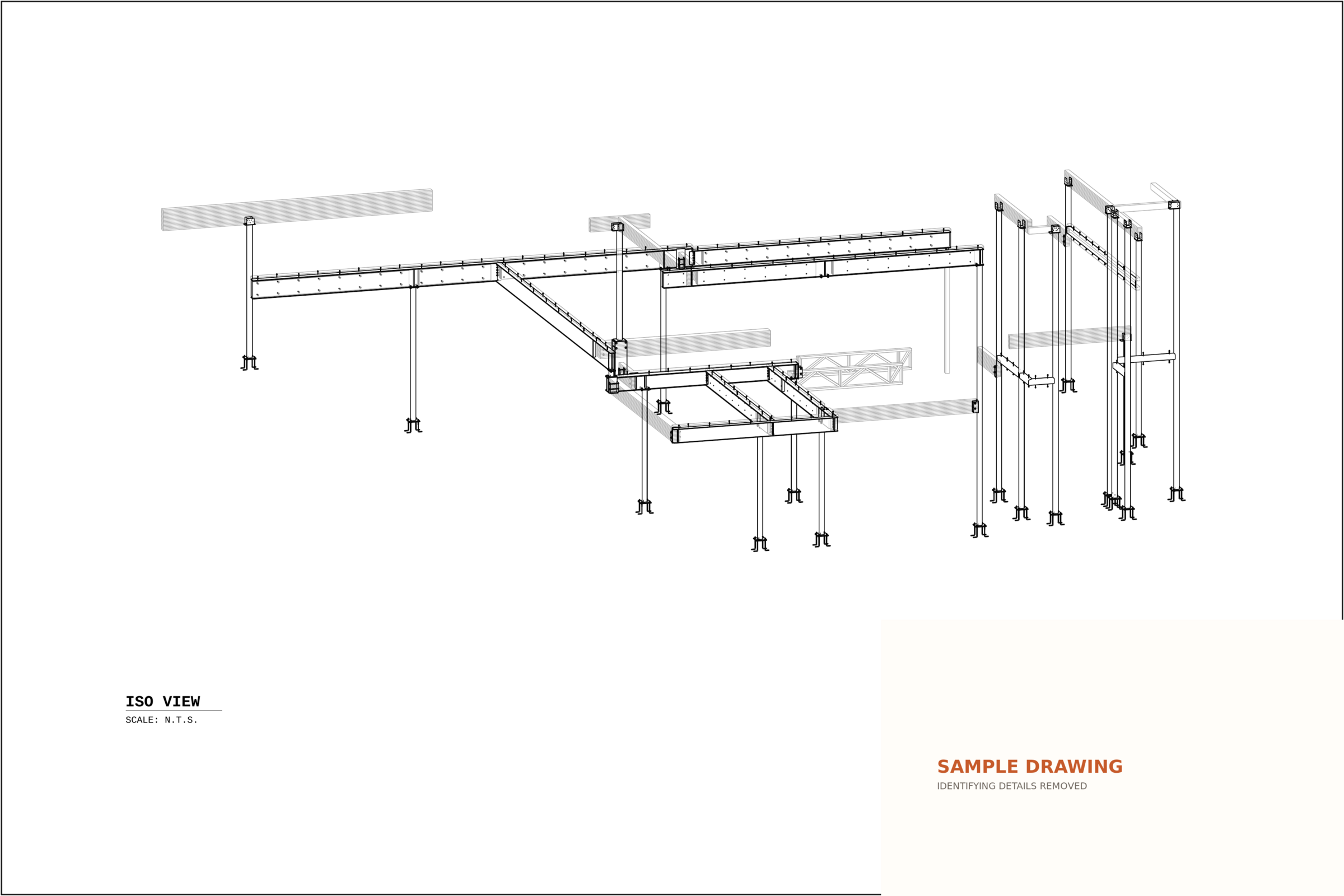
Assembly overview
A clear assembly view supported by member marks, dimensions, and fabrication notes.
Open full size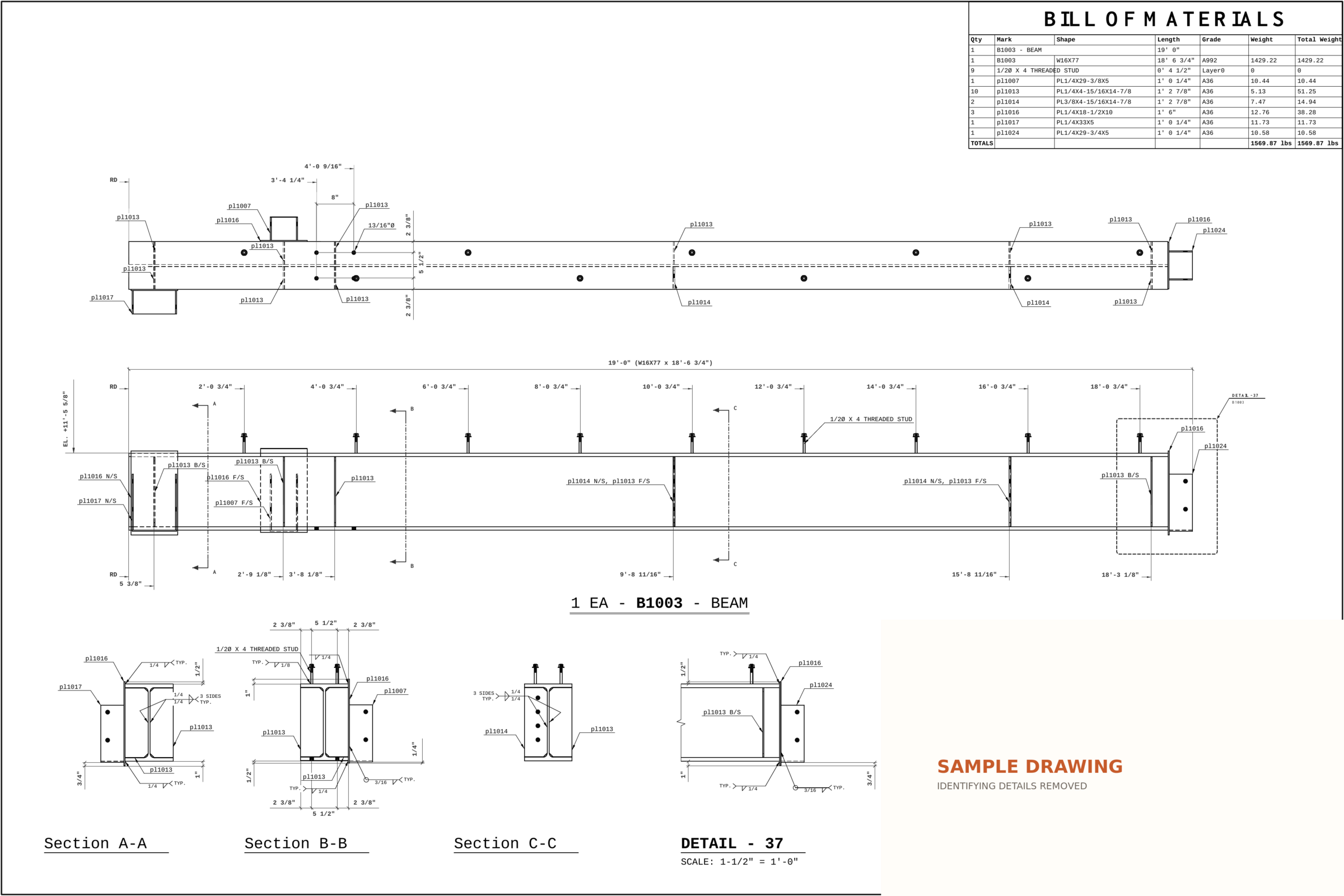
Fabrication detail
Detailed member geometry with dimensions, weld information, section callouts, and material data.
Open full size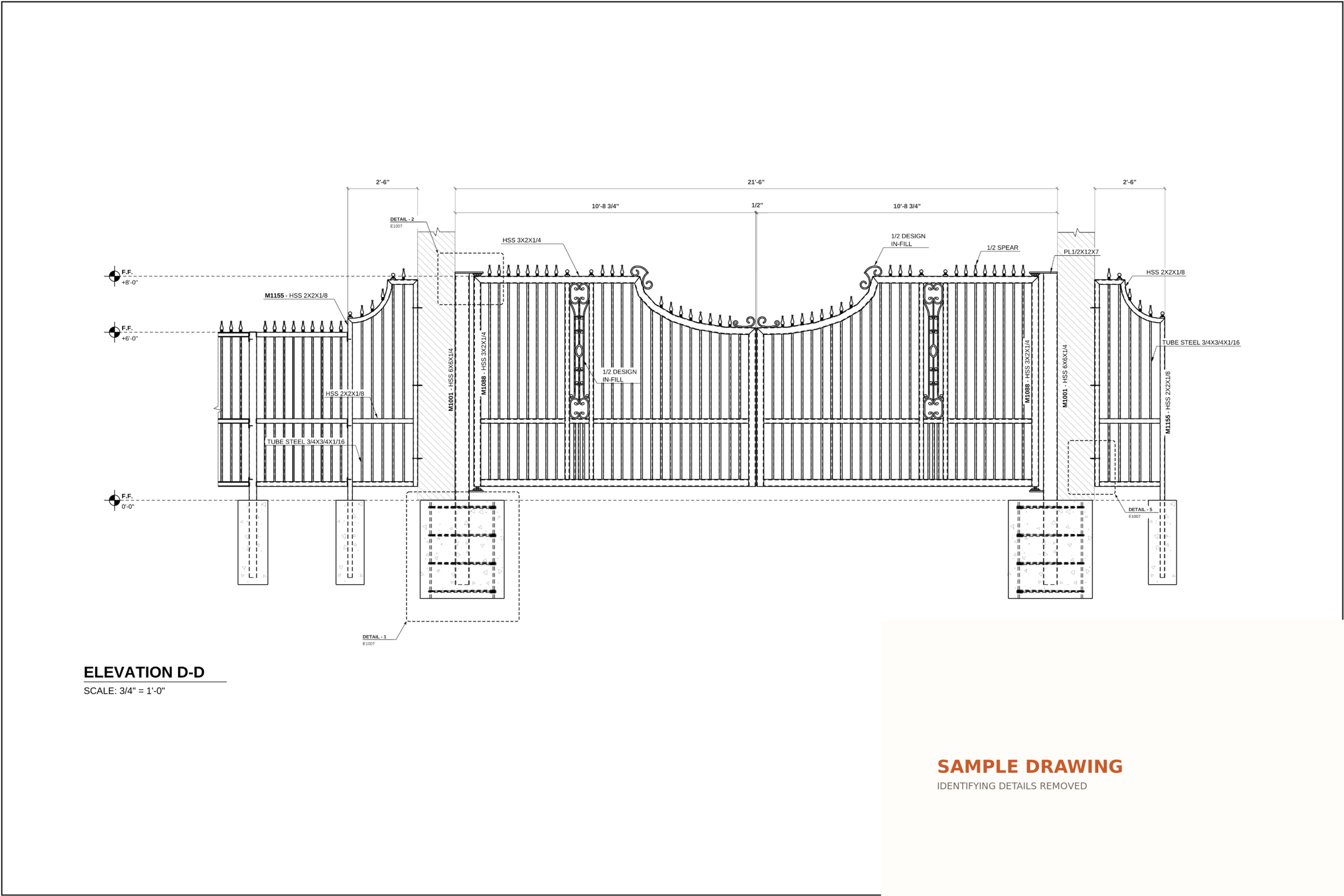
Gate elevation
An ornamental assembly laid out with overall dimensions, component relationships, and connection callouts.
Open full size
Framing overview
A clean project-wide isometric showing columns, beams, base connections, and surrounding reference geometry.
Open full size
Layout drawing
A coordinated plan with grid dimensions, column callouts, base-plate information, north arrow, and revision clouds.
Open full size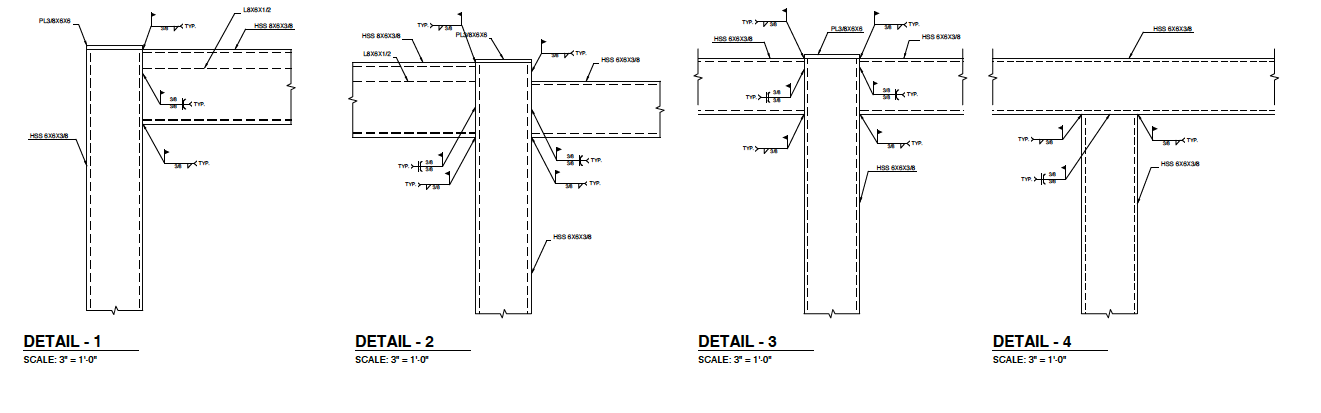
Connection details
Enlarged beam-to-column connections with member labels, plate callouts, weld symbols, and hidden linework.
Open full sizeSample sheets are published with identifying project, company, customer, and contact information removed.
Early access pricing
Use the complete Steel Fab Lab workflow free for 30 days. No card is required, and nothing renews automatically.
Professional
$25/ month
30 days free with no card. Subscribe for $25/month when the trial ends. This subscription covers the Steel Fab Lab extension and companion drawing workspace, not a standalone modeling app. Your own SketchUp Pro license is required and is not included. SketchUp Go, web, and mobile versions are not supported.
Ready to test the workflow?